SLA-style trees · FDM-tuned
Drop in an unsupported STL, orient it, and generate SLA-style tree supports and a raft shaped for stiff-PLA, gravity-only printing — fewer contacts, less scarring, cleaner minis. Export a universal 3MF that opens in any slicer, with the supports as a separate, selectable object.
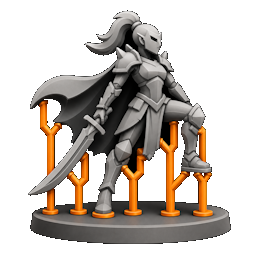
Why it's different
Resin slicers over-support for peel and suction forces that don't exist on an FDM printer. Generic FDM supports throw up dense, blocky walls that scar detail. We borrow SLA's tree shape — not its density — because PLA is stiff, prints upright, and only ever fights gravity.
The workflow
Five steps, in order — no auto-orientation forcing your hand.
Drop in an unsupported miniature — ASCII or binary STL. Add a whole tray of them into one project with groups, and tune each model on its own.
Rotate it in the 3D viewport while live overhang shading tints every face steep enough to need support. Type a real-world height and it scales to fit.
One click builds SLA-style tree supports routed around the model with girth-aware collision, plus a raft under the support roots only — parts that already touch the bed print straight onto it.
Click the model to add a support exactly where you want one — the hit surface decides its angle. Select and delete any you don't want. You stay in control.
Your model and its supports come out as two separate objects grouped as one unit — so in your slicer you can give the supports their own material or settings without ungrouping them.
Side by side
Resin-minded supports on the left, FDM Forge on the right — on real prints. Fewer contacts, less to cut and sand, and the detail left intact.
What you get
Not a slicer, not a modeller — the step in between that FDM has been missing.
Fewer, lighter supports because stiff PLA bridges what resin can't. Less plastic, less clean-up, fewer scars on the model.
A clean, universal 3MF with no slicer-specific config baked in. Supports arrive as real, selectable geometry in Orca, Bambu Studio, Prusa or Cura.
Model and supports export grouped but distinct, so you can hand the supports a different material or print profile — and they still stay one unit on the plate.
Manual orientation and manual support editing — click to add, select to delete. No black-box auto-orient deciding for you.
Struts drop, branch into shared trunks, bridge across a cluster, or escape past the footprint — so hair, capes and spindly bits share clean routes to the bed.
Load a whole tray into one project with groups, tune each mini independently, and save everything to a single .msf you can reopen later.
Plays nice
FDM Forge is the step before your slicer, not a replacement for it. You export a standard 3MF and slice it wherever you already do.
See for yourself
Don't take our word for it. These are real exports — the model and its tree supports as two separate, grouped objects, exactly as the tool produces them. Load one in your slicer and the supports come in as selectable, printable geometry.
Grouped as one unit on the plate — select Supports to give it its own material or settings, or delete it. Your slicer may offer to "repair" the overlapping support solids on import; that's expected and safe.
Pricing
Run the full experience free in your browser. If it earns a place in your print workflow, buy it for $9.99. That's the honor system: no DRM, no license servers, no nagware, no subscription — just a fair trade for a tool that saves you filament and sanding.
Buy it once and it's yours — no copy protection to fight, and every update is free. No upgrade fees, ever.
↑ Secure checkout link goes live at launch.
Questions
No — it's the step before it. You orient your mini and generate supports here, export a standard 3MF, then slice that in OrcaSlicer, Bambu Studio, PrusaSlicer, Cura, or whatever you already use. FDM Forge just gives you far better supports going in.
Any FDM printer. The defaults are tuned for firm PLA / PLA+ printed upright — stiff material, gravity the only enemy. The build plate defaults to 256×256×256 mm (Bambu-class) and is fully adjustable.
The desktop app for your operating system — Windows, macOS, or Linux. The free browser demo runs the tool in-browser so you can try it before you spend a cent.
Yes. One-time, $9.99, honor system. No subscription, no per-seat licensing, no nagware. Buy it once and keep it.
None. No DRM, no activation, no license server, no phone-home — you download it and it runs, online or off. And every update is free: buy it once, get every future version at no extra cost.
Import an STL (ASCII or binary). Export a clean, universal 3MF with your model and supports
as two grouped-but-separate model objects — so any slicer treats
the supports as printable geometry you can select and restyle.
Ready when you are
Open the browser demo, load a model, and watch the tree grow. If it saves you filament and sanding, it's yours for $9.99.